ExtrasExtras
De petits cadeaux pour attendre le jeu. Gratuits, sans compte, sans inscription.Small gifts while you wait for the game. Free, no account, no sign-up.
Aitzaga Glass — un skin pour VLCAitzaga Glass — a skin for VLC
Votre lecteur vidéo aux couleurs du jeu : verre sombre, braise et givre, le symbole d'Aitzaga quand rien ne joue.Your video player in the game's colours: dark glass, ember and frost, and the Aitzaga symbol when nothing is playing.
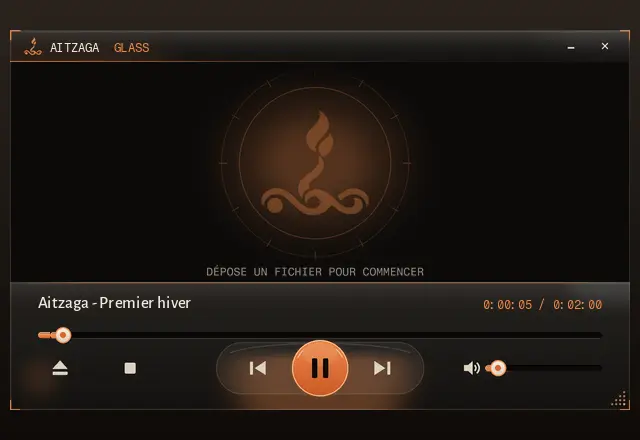
Télécharger le skin (.vlt, 322 Ko)Download the skin (.vlt, 322 KB)
InstallationInstallation
- Copiez
aitzaga-glass.vltdans le dossierskinsde VLC :C:\Program Files\VideoLAN\VLC\skins\(ou%APPDATA%\vlc\skins\).Copyaitzaga-glass.vltinto VLC'sskinsfolder:C:\Program Files\VideoLAN\VLC\skins\(or%APPDATA%\vlc\skins\). - Dans VLC : Outils › Préférences › Interface, cochez « Utiliser un style personnalisé », puis choisissez le fichier.In VLC: Tools › Preferences › Interface, tick “Use a custom skin”, then pick the file.
- Redémarrez VLC. Pour revenir au style d'origine, choisissez « Interface native ».Restart VLC. To go back, choose “Native style”.
Pour VLC 3.x uniquement (VLC 4 n'a pas encore de format de skin stable). Testé avec VLC 3.0.20 sous Linux ; sous Windows, dites-nous si quelque chose cloche. Projet de fan, non affilié à VideoLAN. Gratuit pour un usage personnel. Polices : Fragment Mono et Alegreya Sans (SIL OFL 1.1), voir crédits.For VLC 3.x only (VLC 4 has no stable skin format yet). Tested with VLC 3.0.20 on Linux; on Windows, tell us if anything is off. Fan project, not affiliated with VideoLAN. Free for personal use. Fonts: Fragment Mono and Alegreya Sans (SIL OFL 1.1), see credits.